Enable Root Login Via SSH
Open the SSH server configuration file in a text editor with root privileges. You can use the following command to open the file with the nano text editor:
Locate the line that begins with #PermitRootLogin and remove the # symbol at the beginning of the line to uncomment it.
Modify the line to allow root login by changing the value after PermitRootLogin to yes:
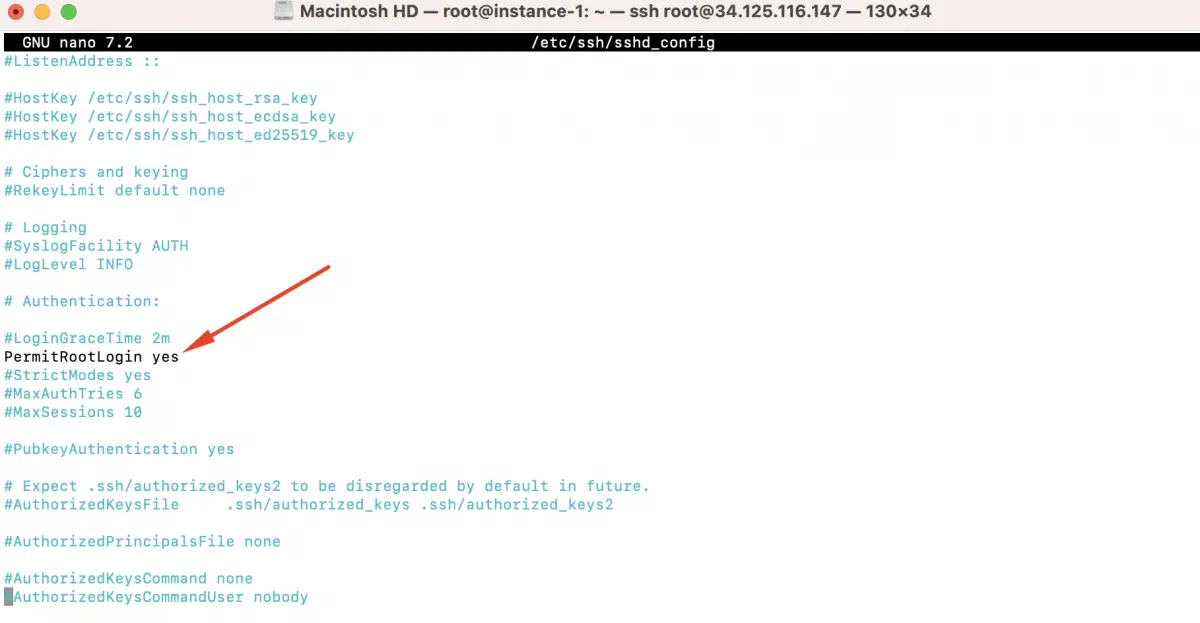
Save the changes and exit the text editor (in nano, press Ctrl + O to save and Ctrl + X to exit).
Restart the SSH service to apply the changes:
Enabling root login via SSH is generally discouraged for security reasons. It is recommended to use SSH key-based authentication and log in as a regular user with sudo privileges instead. If you need administrative access, you can use the sudo command to execute commands as root when necessary.
Bibliography: https://www.devtutorial.io/how-to-enable-root-login-via-ssh-debian-12-p3112.html